CSS doesn't show up in Search Console as its own ranking factor — but Core Web Vitals do, and four modern CSS features directly improve them. Here's the connection, with working code for each.
Quick Answer
Yes, indirectly but measurably. Google uses Core Web Vitals — Largest Contentful Paint, Cumulative Layout Shift, and Interaction to Next Paint — as page experience ranking signals, and CSS choices directly influence all three, from render-blocking stylesheets to layout-shifting breakpoints to animation-driven main-thread work.
CSS will never appear as its own line item in a Search Console report. What does appear are the three Core Web Vitals, and each of them has a direct, traceable line back to CSS decisions. Largest Contentful Paint (LCP) is slowed by render-blocking stylesheets and unnecessarily large CSS bundles the browser must parse before it can paint. Cumulative Layout Shift (CLS) is caused, more often than not, by exactly the kind of abrupt size changes that fixed breakpoints and unstyled image placeholders produce. Interaction to Next Paint (INP) — the metric that replaced First Input Delay in 2024 — is affected by how much main-thread work an interaction triggers, which includes JavaScript-driven animations that a native CSS feature could have handled instead.
This article covers four specific, current CSS features — cascade layers, the View Transitions API, fluid `clamp()` sizing, and `@scope` — each of which maps onto a real, well-defined improvement to one or more of these metrics, plus a fifth practical pattern (CSS-only dark mode) that avoids a common but under-discussed user-experience regression. None of these are exotic; all four ship in current versions of every major browser engine, and all four are things you can start using in production today.
The mechanism matters more than the buzzword:“use modern CSS” isn't useful advice on its own. The value in each section below is the specific cause-and-effect relationship between a CSS feature and a measurable Core Web Vitals outcome — that's what to take away, not just the feature name.
Google's published thresholds give a concrete target to optimize against rather than a vague directional goal: LCP should occur within 2.5 seconds, CLS should stay under 0.1, and INP should stay under 200 milliseconds — each measured at the 75th percentile of real visits, not in a single synthetic lab test. That percentile detail matters: a site that's fast for most users but has a long tail of slow visits on older devices or poor connections can still fail these thresholds in aggregate, which is exactly the kind of gap that disciplined, lightweight CSS — rather than a single big optimization — tends to close.
It's also worth being precise about causality versus correlation here. Google has stated Core Web Vitals are one of many ranking signals, and a generally smaller factor than overall content relevance and quality. The honest framing is: fixing your CSS won't turn a mediocre, thin page into a top result, but it removes a real, measurable drag on a page that's otherwise competitive — and on competitive, content-equal queries, that drag is often the actual difference between positions.
Quick Answer
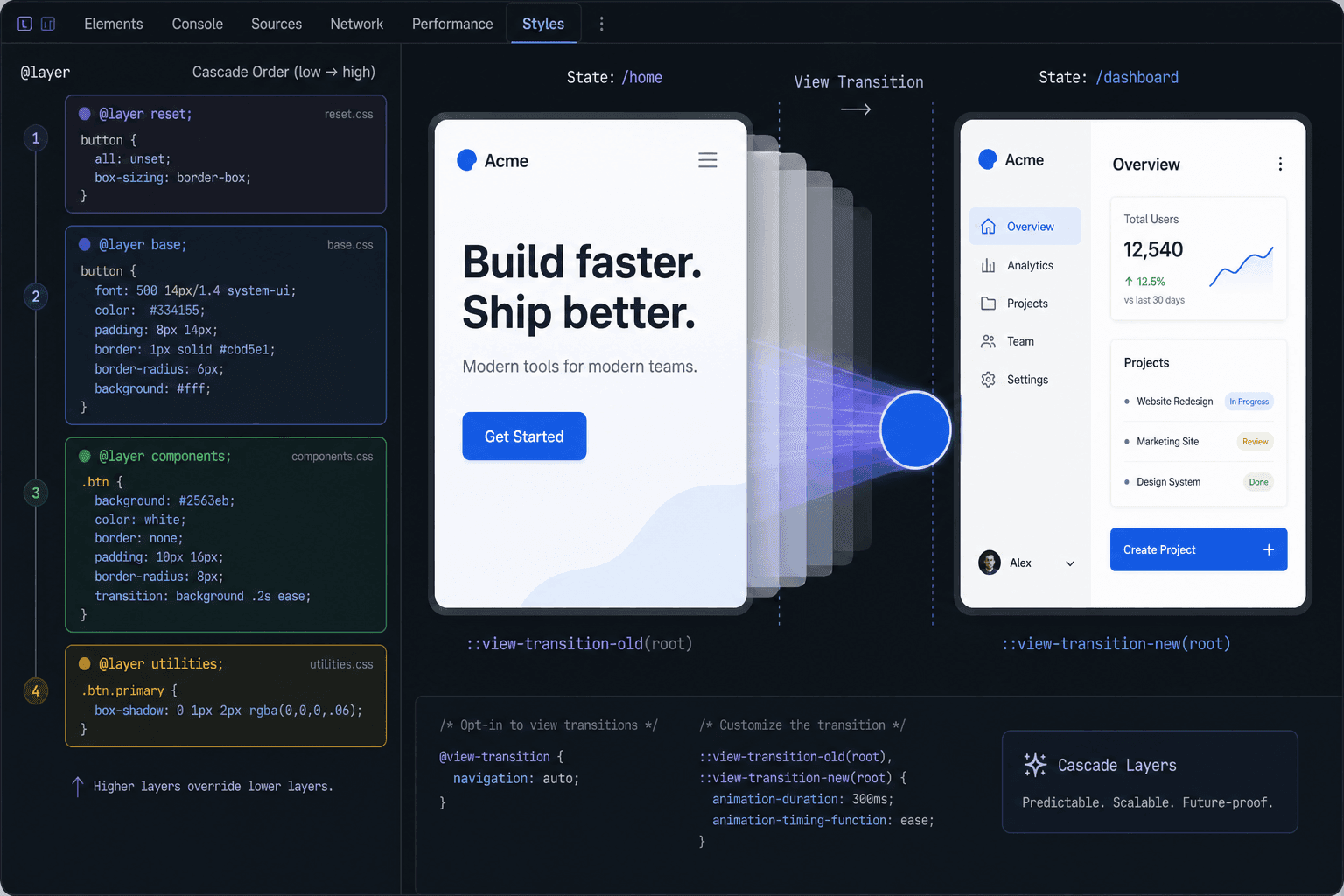
@layer groups CSS into named priority buckets controlled by declaration order instead of selector specificity, which eliminates the need for !important and inflated selectors that otherwise cause CSS bundles to grow unnecessarily large and harder to maintain over time — an indirect but real contributor to LCP on CSS-heavy sites.
Specificity wars are one of the quietest sources of CSS bloat on any codebase that's been actively developed for more than a year or two. Every time a developer can't get a style to apply and reaches for `!important` or a more specific selector than necessary to win, the CSS file grows a little, and the next developer who needs to override that rule has to go a little further still. Cascade layers break this cycle structurally: priority is determined by which named layer a rule sits in, declared once at the top of the file, completely independent of how specific any individual selector is.
/* Priority is set by this declaration order — last wins */@layer reset, base, components, utilities; @layer reset { * { margin: 0; box-sizing: border-box; }} @layer components { .card { padding: 16px; border-radius: 8px; }} @layer utilities { /* This wins over .card above, with zero specificity tricks */ .p-0 { padding: 0; }}The connection to Core Web Vitals here is indirect but real: a smaller, more disciplined CSS bundle parses and applies faster, which matters for LCP especially on slower connections and lower-powered devices where CSS parsing isn't instantaneous. The bigger win is maintainability — but maintainable CSS is CSS that stays small instead of accumulating defensive overrides indefinitely, and that has a genuine, compounding performance benefit over the life of a project.
You can design and visualize a layer order — including a live priority stack so you can see exactly which layer wins before you commit to a structure — with the CSS Cascade Layers Generator.
You don't need to migrate an entire existing stylesheet into layers to benefit from them. Any CSS not explicitly assigned to a layer is automatically treated as higher priority than all layered styles, which means you can introduce `@layer` incrementally — start by moving genuinely foundational styles (a reset, design tokens, base element styles) into layers, leave the rest of the existing codebase as unlayered overrides for now, and migrate further only as you touch each part of the codebase anyway.
Quick Answer
The View Transitions API hands animation work to the browser's compositor instead of a JavaScript library running on the main thread, which reduces the main-thread work an interaction triggers — directly relevant to Interaction to Next Paint, the Core Web Vital most sensitive to JS execution cost.
A JavaScript animation library has to calculate intermediate frame values and apply them, competing with everything else happening on the main thread — including the work needed to respond to the next user interaction. The View Transitions API moves this work to the browser's own rendering pipeline: you name an element, optionally customize the transition, and the browser handles capturing before/after snapshots and animating between them natively.
/* 1. Name the element you want to transition */.card { view-transition-name: product-card; } /* 2. Customize the transition (optional — default is a cross-fade) */::view-transition-old(product-card),::view-transition-new(product-card) { animation-duration: 0.4s; animation-timing-function: cubic-bezier(0.16, 1, 0.3, 1);} /* 3. Trigger it from JS when you update the DOM */function updateCard() { if (document.startViewTransition) { document.startViewTransition(() => { // ...swap content, toggle classes, update state }); } else { // fallback: update directly, no animation }}This doesn't mean every JS animation library is now obsolete — complex, physics-based, or gesture-driven animations may still need one. But the large category of “cross-fade or morph between two UI states” that previously justified pulling in a library can frequently be handled natively now, which is both a bundle-size win (no library to download and parse) and an INP win (no JS animation loop competing for main-thread time during the transition).
You can test fade, slide, and scale effects against a real, working implementation — not a mockup — with tunable duration and easing, using the View Transitions Generator.
Support is strong in Chromium-based browsers and arrived more recently in Safari and Firefox, so a fallback path still matters: feature-detect with `if (document.startViewTransition)` and update the DOM directly when it's unavailable, as shown in the code above. Users on unsupported browsers simply see an instant state change with no animation at all — there's no broken or degraded experience to design around, which makes this one of the lowest-risk modern CSS features to adopt today even with partial support.
Quick Answer
clamp() scales a value continuously with the viewport instead of jumping between fixed values at media query breakpoints, which avoids the abrupt size changes — and the layout shift they can cause in surrounding content — that a breakpoint-based approach is prone to.
A heading that's 32px below a breakpoint and 56px above it doesn't just look inconsistent at in-between viewport widths during a resize — on a real device, the same kind of step-function size change can occur at orientation change, or when a browser's UI chrome appears/disappears and changes the effective viewport height, both of which can register as unexpected layout shift if surrounding elements have to reflow to accommodate the new size.
/* Old approach: jumps at each breakpoint */h1 { font-size: 32px; }@media (min-width: 768px) { h1 { font-size: 40px; } }@media (min-width: 1200px) { h1 { font-size: 56px; } } /* Fluid approach: scales continuously, no jump, no extra media queries */h1 { font-size: clamp(2rem, 1.2rem + 3vw, 3.5rem);}The fluid version scales smoothly across the entire viewport range with a single declaration, no breakpoints required. This is genuinely less code to maintain, not just a performance trick — fewer media queries means fewer places a future redesign has to touch.
The math behind a correct `clamp()` value (the slope and y-intercept that produce smooth scaling between two specific size/viewport pairs) is mechanical but easy to get wrong by hand. The Fluid clamp() Calculator computes it for any property — not just font-size — with a live viewport-width slider to preview the result before you ship it.
It's easy to think of `clamp()` as a font-size trick specifically, since fluid typography was the technique's first popular use case. The same approach applies cleanly to padding, gap, margin, width, and border-radius — anywhere a fixed value currently changes at a breakpoint is a candidate. Applying it consistently across a layout, not just headings, is where the CLS benefit compounds the most, since it's the interaction between multiple resizing elements that tends to produce the most visible shift.
Quick Answer
@scope contains a style rule to a specific subtree, with an optional lower boundary that excludes nested content — structurally preventing the kind of unrelated specificity collisions that, on a large codebase, are a recurring source of the defensive CSS bloat discussed in the cascade layers section above.
Naming conventions like BEM exist specifically to work around the absence of real style scoping in CSS — by encoding the intended scope into the class name itself and hoping everyone follows the convention consistently. `@scope` makes that containment structural instead of conventional: a rule scoped to `.card` simply cannot accidentally style something outside a `.card`, regardless of what anyone names their classes.
/* Style a card's own content, but never reach into embedded/nested content the card happens to contain */@scope (.card) to (.card-embed) { p { color: var(--color-card-text); }}The practical Core Web Vitals connection is the same one as cascade layers: structurally safer CSS is CSS that doesn't need to keep adding overrides to fix accidental collisions, which keeps the overall stylesheet smaller and faster to parse than the alternative, over the life of a growing codebase.
The CSS @scope Generator includes a live before/after demo so you can see exactly how a boundary stops styles from leaking into nested content, before you commit to the pattern in your own codebase.
The clearest real-world case for `@scope` isn't naming discipline within your own team's code — it's the content you don't control at all: a CMS-rendered rich-text field, an embedded widget, or syndicated content dropped into a card component. Without a boundary, a generic `.card p ` rule reaches into whatever markup that embedded content happens to produce. A scoped rule with an explicit lower boundary around the embedded region contains your design system's styles to your own markup and leaves the embedded content to render with its own styles, untouched.
Quick Answer
Beyond the four features above, CSS-only dark mode theming and pure-CSS decorative backgrounds are two more practical patterns with a direct Core Web Vitals connection — avoiding a JS-driven theme flash, and avoiding the bandwidth cost of a hero image entirely.
A theme toggle implemented entirely in JavaScript — adding a class to `<html>` after checking `localStorage` — has to run before the user notices the wrong theme, which on a slow connection or a low-powered device, it sometimes doesn't. The fix is to drive theming with CSS custom properties and `prefers-color-scheme` so the correct theme is determined by the browser before first paint, with JavaScript only needed for a manual override that beats the system preference.
/* CSS-only theming — correct theme paints on the first frame, no JS required before first paint, no flash */:root { --color-bg: #ffffff; --color-text: #111111;} @media (prefers-color-scheme: dark) { :root { --color-bg: #111110; --color-text: #f0f0f0; }} body { background: var(--color-bg); color: var(--color-text);}The CSS Variables Theme Builder generates exactly this pattern — a `:root` default, an automatic `prefers-color-scheme` override, and an optional `[data-theme]` block with a toggle function for manual switching that beats the system preference when needed.
A trendy gradient-blob hero background implemented as a hero image carries real LCP cost — it's one more network request and one more asset the browser has to download and decode before the largest visible element can paint. The same visual effect built from stacked `radial-gradient()` backgrounds costs nothing to download — it's pure CSS, generated by the browser itself with no image file at all.
The Mesh Gradient Generator builds this exact effect, with editable color blobs, softness control, and an optional slow drift animation, output as a single CSS background rule with no images or canvas involved.
Between the four core techniques above and these two supporting patterns, six free tools cover the practical implementation of everything in this guide: the Cascade Layers Generator, the View Transitions Generator, the clamp() Calculator, the @scope Generator, the Theme Builder, and the Mesh Gradient Generator — all free, no signup, all run entirely in your browser.
Every technique in this guide has a sound theoretical basis, but the actual impact on your specific site depends on your specific CSS, your specific traffic, and your specific devices. Run Lighthouse before and after each change for a controlled, lab-based comparison, and check the Core Web Vitals report in Search Console (backed by the Chrome User Experience Report) after the change has had a few weeks to accumulate real-user data — lab and field data can disagree, and field data is what actually feeds into ranking signals.
Does CSS really affect SEO?
Yes, indirectly but measurably, through Core Web Vitals — LCP, CLS, and INP are all influenced by CSS choices, and Google uses them as page experience ranking signals.
What are CSS cascade layers (@layer)?
A way to group CSS rules into named priority buckets controlled by declaration order, not selector specificity — removing the need for !important or inflated selectors to win the cascade.
Does the View Transitions API replace JavaScript animation libraries?
For common cases like cross-fading between two states, yes. Complex or highly custom animations may still need a JS library, but most everyday UI transitions don't.
How does clamp() improve Cumulative Layout Shift?
It lets a value scale continuously with the viewport instead of jumping between fixed values at breakpoints, avoiding the abrupt size changes that can shift surrounding content.
What does @scope do that regular class names don't?
It contains a rule to a specific subtree structurally, rather than relying on naming discipline alone to avoid collisions.
Why does a dark mode flash hurt Core Web Vitals?
A JS-driven theme toggle that runs after paint causes a visible flash from the wrong theme to the right one — a real degradation of perceived performance that CSS-only theming avoids entirely.
