
What Are CSS Cascade Layers?
Quick Answer
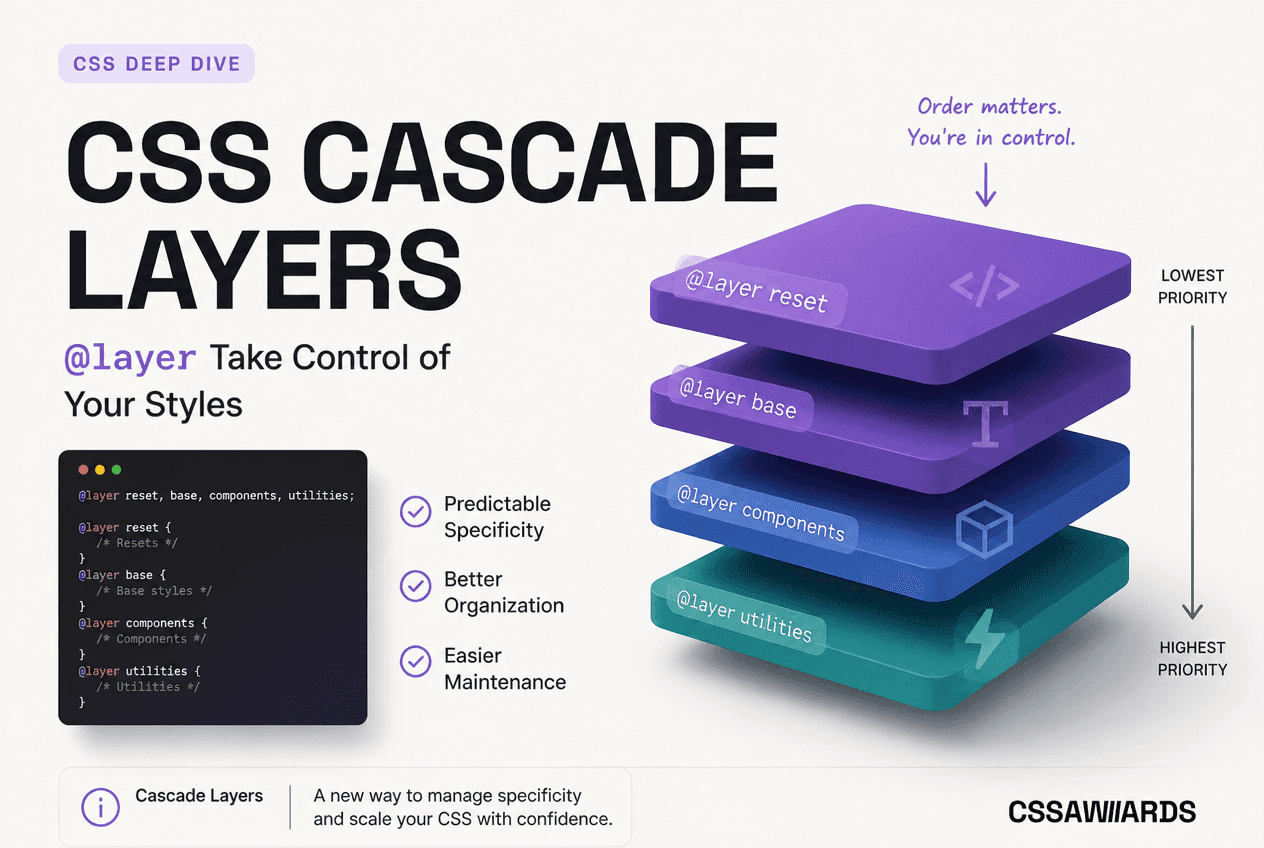
CSS cascade layers, declared with @layer, are named groups of style rules that get an explicit priority order independent of selector specificity. A rule in a later-declared layer always overrides a rule in an earlier-declared layer, no matter how specific the earlier rule’s selector is. They let you control override behavior through architecture instead of specificity tricks or !important.
CSS has always resolved conflicting rules the same way: by comparing specificity (id, class, element counts), and when specificity ties, by source order (last rule wins). This works fine in a small stylesheet. It falls apart the moment a project mixes a CSS reset, a component library, third-party widgets, and hand-written utility classes — because none of those layers of the codebase agree on how specific their selectors “should” be, and the only way to force an override has been to write a more specific selector or reach for !important.
Cascade layers, part of the CSS Cascading and Inheritance Level 5 specification, add a new step to the cascade that runs before specificity is even considered. You declare layers, you declare their order, and that order decides which layer wins — full stop. Specificity only matters for breaking ties between rules that live inside the same layer.
This is a genuinely different way of thinking about CSS architecture. Instead of relying on naming conventions or specificity discipline to keep rules in the right override order, the browser enforces the order you declared, mechanically, every time.
The Problem @layer Solves
Anyone who has shipped a production site knows the pattern: a component library ships selectors like .btn.btn-primary.btn-large, and overriding it from your own stylesheet means either writing something even more specific, or reaching for !important — which then needs an even louder !important the next time someone needs to override that.
/* ── Before cascade layers: specificity wars ── */ /* Vendor/framework CSS ships with specific selectors */.btn.btn-primary.btn-large { background: blue; } /* Your override needs to be MORE specific, or use !important */.my-page .btn.btn-primary.btn-large.custom { background: green; /* barely wins — fragile, easily broken later */} /* Or the dreaded !important escalation */.button { background: green !important; } /* ── After cascade layers: architecture wins, not selector cleverness ── */@layer vendor, custom; @layer vendor { .btn.btn-primary.btn-large { background: blue; }} @layer custom { .button { background: green; } /* wins — later layer, any specificity */}With cascade layers, the vendor CSS goes into its own layer, your own CSS stays unlayered (or in a later layer), and the override just works — no specificity arms race, no !important escalation. If you want to see exactly how a given selector’s specificity compares to another before you had layers, the CSS Specificity Calculatoris useful for auditing legacy CSS — but remember: once cascade layers are involved, specificity comparisons between different layers stop mattering entirely.
Basic Syntax: Declaring and Ordering Layers
Quick Answer
Declare the order first with @layer reset, base, components, utilities; — this locks in priority immediately, even before any layer has rules. Then add rules to a layer anywhere in the file with @layer name { selector { property: value; } }. A layer can be added to multiple times; all its rules merge into that layer’s position.
/* Declare the layer order up front — this locks priority even before any layer has rules in it */@layer reset, base, components, utilities; /* Add rules to a layer anywhere in the file */@layer base { body { margin: 0; font-family: system-ui, sans-serif; }} @layer components { .button { padding: 0.75rem 1.5rem; border-radius: 6px; }} @layer utilities { .mt-0 { margin-top: 0; }}The order-declaration statement (@layer reset, base, components, utilities; with no rule bodies) is optional but strongly recommended at the top of your entry stylesheet. Without it, layers are ordered by when they are first encountered in the cascade — which is harder to reason about once CSS is split across multiple files, bundled, or imported in an order you don’t fully control. Declaring the order explicitly up front removes that ambiguity completely. You can prototype and visualise a layer stack before committing it to code with the CSS Cascade Layers Generator— it lets you reorder layers with drag-and-drop and see the resulting priority stack live.
Note:Layer names are case-sensitive identifiers, not strings. You cannot re-declare a layer’s position once it has been established by its first appearance (whether via the order statement or a rule block) — later mentions of the same name just add more rules to the layer, they do not move it.
How Layer Order Overrides Specificity
Quick Answer
Layer order is evaluated before specificity. A single class selector (0,1,0) in a later-declared layer overrides an id-plus-three-classes selector (0,4,1) in an earlier-declared layer. Specificity and source order only decide ties between rules inside the same layer.
This is the single most important rule in the entire specification, and the one most tutorials gloss over. It is worth seeing proven with an intentionally lopsided example:
@layer base, utilities; @layer base { /* High specificity: 3 classes = (0,3,0) */ .card.featured.highlighted { color: blue; }} @layer utilities { /* Low specificity: 1 class = (0,1,0) */ .text-red { color: red; }} /* <div class="card featured highlighted text-red"> renders RED. *//* .text-red wins even though its specificity (0,1,0) is far *//* lower than .card.featured.highlighted's (0,3,0) — because *//* `utilities` was declared AFTER `base`. Layer order always *//* beats specificity, full stop. */What wins and why: .text-red has a specificity of (0,1,0) — about as low as a class selector gets. .card.featured.highlighted has a specificity of (0,3,0) — three times higher. In a world without cascade layers, the higher-specificity rule would win regardless of source order. But because utilities was declared after base, every rule in utilities outranks every rule in base, before specificity is ever compared. This is exactly the behaviour that makes a one-off utility class like .mt-0reliably win against a much more specific component selector — which is otherwise one of the hardest problems in utility-class CSS architecture.
Unlayered Styles Always Win — Except Against !important
There is one priority level higher than even the last-declared cascade layer: CSS that is not inside any @layer block at all.
@layer utilities { /* Inside the highest-priority layer, no !important */ .text-red { color: red; }} /* Un-layered rule — not inside any @layer block */.card { color: blue; } /* <div class="card text-red"> still renders BLUE. *//* Un-layered author CSS always outranks ANY layered CSS — *//* regardless of specificity or where it sits in source order. *//* This holds even if .card appears BEFORE the @layer block — *//* being unlayered is what wins, not source position. */This means the safest way to guarantee an override wins, with zero ceremony, is to simply not put it in a layer. Many teams use this deliberately: everything imported from vendors and design-system packages goes into named layers, while the project’s own hand-written page-level or override CSS stays unlayered by default, so it always has the final say — without needing to be the very last thing in the declared layer order.
The !important Reversal Inside Layers
Quick Answer
Inside cascade layers, !important reverses the priority order: an !important declaration in an earlier-declared layer wins over an !important declaration in a later-declared layer — the opposite of the normal rule. An un-layered !important declaration still beats every layered !important, earlier or later.
This is the detail that trips up almost everyone the first time, including experienced developers who have used !importantfor years. It is not a bug or an edge case — it is intentional, specified behaviour, and it exists for a good reason.
@layer reset, utilities; @layer reset { /* !important inside the EARLIER-declared layer */ * { box-sizing: border-box !important; }} @layer utilities { /* !important inside the LATER-declared layer */ .content-box { box-sizing: content-box !important; }} /* <div class="content-box"> still gets border-box. *//* Inside cascade layers, !important REVERSES the order: *//* the EARLIER layer's !important wins over the LATER layer's *//* !important — the opposite of the normal (non-important) rule. */ /* An un-layered !important still beats every layered !important, *//* whether that layered rule is in an earlier or later layer: */.always-wins { box-sizing: content-box !important; } /* wins over both above */What wins and why: Normally, utilities (declared second) would beat reset (declared first). But because both declarations use !important, the order flips: reset’s !important wins. The specification designed it this way so that a reset layer — almost always declared first, precisely because it should be easiest to override — can still use a handful of !important declarations (for things like accessibility resets) that are genuinely hard for later, well-meaning layers to accidentally clobber. Think of !important priority as running in the opposite direction from normal priority, with unlayered !important sitting above both directions as the ultimate trump card.
Practical takeaway: avoid mixing !important across multiple layers unless you have deliberately reasoned through this reversal. For most projects, the simplest rule is: keep !important out of layered CSS entirely, and reserve it only for genuine, rare unlayered overrides.
Importing Stylesheets Into a Layer
@import gained a layer()function specifically to work with cascade layers — letting you pull an entire external stylesheet into a named layer in a single line, without touching that file’s own contents:
/* Import a whole stylesheet directly into a named layer */@import url("tailwind-preflight.css") layer(vendor);@import url("bootstrap.css") layer(vendor); /* Declare your own layer order so vendor CSS is guaranteed to lose to your own styles */@layer vendor, base, components, utilities; /* Your own CSS — left un-layered — always wins over ANY of the imported vendor CSS, no overrides needed */.btn { background: var(--color-accent);}This is the cleanest way to isolate any CSS you did not author — a component library, a CSS reset package, an embed widget’s stylesheet — into a layer you fully control the position of, without editing a single line of the third-party file itself.
Nested / Sub-Layers With Dot Notation
Layers can nest inside other layers using dot notation, letting you subdivide a broad layer like components into smaller, individually addressable pieces without losing the overall grouping:
@layer components; @layer components.buttons { .btn { padding: 0.75rem 1.5rem; }} @layer components.cards { .card { border-radius: 8px; }} /* Reference the full dotted path to add to a sub-layer later, from anywhere in the same or another stylesheet */@layer components.buttons { .btn--large { padding: 1rem 2rem; }} /* components.cards and components.buttons both sit wherever *//* `components` was declared in the top-level order — and are *//* ordered relative to EACH OTHER by their own declaration order *//* the same layer-order-beats-specificity rule applies recursively */Sub-layers follow the exact same layer-order-beats-specificity rule recursively: within components, whichever sub-layer was declared later wins, independent of the specificity of the selectors inside each sub-layer. This scales the mental model cleanly — you never need more than “later beats earlier” at whatever level of nesting you are reasoning about.
Anonymous (Unnamed) Layers
A layer does not need a name. An anonymous layer still occupies a real position in the overall order, but because it has no identifier, no other rule anywhere can add to it later:
/* An anonymous layer still occupies a position in the order... */@layer { .reset-once { all: unset; }} /* ...but has no name, so it can never be added to again from *//* anywhere else. Useful for a genuinely one-off, self-contained *//* block — most real projects should prefer NAMED layers so *//* multiple files or components can contribute to the same layer. */Anonymous layers are a narrow tool — reach for them only when a block of CSS is genuinely self-contained and will never need contributions from elsewhere. For anything shared across components or files, a named layer is almost always the right choice.
Practical Architecture: Reset to Utilities
The most common, battle-tested layer order for real projects looks like this — reset and design tokens first (lowest priority, meant to be overridden by everything), utilities last (highest priority, meant to reliably win against everything):
/* A common, battle-tested layer order */@layer reset, tokens, base, vendor, layout, components, utilities; @layer reset { *, *::before, *::after { box-sizing: border-box; margin: 0; }} @layer tokens { :root { --color-accent: #1D9E75; --space-4: 1rem; }} @layer base { body { font-family: system-ui, sans-serif; line-height: 1.5; }} @layer vendor { @import url("some-library.css");} @layer layout { .container { max-width: 1200px; margin-inline: auto; }} @layer components { .card { border: 1px solid #e5e7eb; border-radius: 8px; padding: 1.5rem; }} @layer utilities { /* Declared LAST — always wins, even a single class beats any component selector's specificity */ .p-0 { padding: 0; } .mt-0 { margin-top: 0; }}Why utilities go last
This is the architectural payoff of cascade layers: a single utility class like .p-0, with a specificity of just (0,1,0), can reliably override any component selector — even .card.featured.dashboard-widget.highlighted — simply because utilities is declared last. Before cascade layers, utility-first CSS frameworks had to either inflate every utility class’s specificity artificially, generate them with !important by default, or rely on strict import-order discipline that broke the moment a bundler reordered files. Cascade layers make this a structural guarantee instead of a convention everyone has to remember to follow.
Cascade Layers vs BEM/ITCSS/!important Chains
CSS architecture methodologies existed for years before cascade layers precisely to solve this same override-order problem — but all of them relied on discipline and convention rather than anything the browser actually enforces:
| Approach | How it controls override order | Weakness cascade layers fix |
|---|---|---|
| BEM | Flat, single-class naming convention avoids nesting-driven specificity growth | Doesn’t solve conflicts with third-party CSS; ties still fall back to source order |
| ITCSS | Manual file/import order (settings → tools → generic → elements → objects → components → utilities) | Fragile — a bundler or accidental reorder silently breaks the intended cascade; nothing enforces it |
| !important chains | Force priority by stacking increasingly loud !important declarations | Impossible to reason about at scale; whoever writes the last, most-forceful rule wins, unrelated to intent |
| Cascade layers (@layer) | Explicit, engine-level priority, independent of specificity or file order | Order is declared once, inspectable, and enforced natively — no naming discipline or build step required |
In practice, cascade layers do not replace BEM or a component-naming convention — they solve a different layer of the problem (pun intended). You can keep BEM class names and put them in cascade layers; the naming convention keeps individual selectors flat and readable, while @layer guarantees the override order between groups of rules regardless of how those selectors are named. For a refresher on how specificity itself is calculated within a single layer, see the CSS Selectors: Complete Guide to Every Selector Type.
Using @layer With Third-Party CSS
The single highest-value use of cascade layers in most real codebases is isolating CSS you did not write — a component library, Tailwind’s base/preflight styles, Bootstrap, or any embedded widget’s stylesheet — so it can never accidentally out-prioritise your own overrides again:
/* Wrap an entire third-party stylesheet in a layer using *//* @import — do this at the very top of your main CSS file */@import url("https://cdn.example.com/component-library.css") layer(vendor); @layer vendor, base, components, utilities; /* Now override ANY vendor style without fighting its specificity */@layer components { .vendor-button { /* Wins over vendor's .vendor-button.primary.large etc, because `components` is declared after `vendor` */ background: var(--color-accent); }}This pattern eliminates an entire category of “why won’t my CSS override the library’s CSS” debugging sessions. Instead of inspecting the library’s compiled selectors to reverse-engineer a specificity high enough to beat them, you simply declare your layer after theirs — done.
Browser Support & Migration Strategy
Quick Answer
Chrome/Edge 99+, Firefox 97+, and Safari 15.4+ — every major engine has supported cascade layers since the first quarter of 2022. By 2026, global support sits around 97%, making @layer one of the safest modern CSS features to adopt without a fallback strategy.
| Browser | Min version | Release date |
|---|---|---|
| Firefox | 97+ | February 2022 |
| Chrome / Edge | 99+ | March 2022 |
| Safari | 15.4+ | March 2022 |
| Global (2026) | ~97% | Production-ready, no fallback typically needed |
/* Cascade layers need no @supports gate for the vast majority of projects — support has been universal since Q1 2022 */@layer base, components, utilities; /* If you must support very old browsers: an unsupported @layer block is simply IGNORED by those browsers, not silently flattened into the normal cascade — so always test the actual fallback behaviour rather than assuming graceful degradation happens automatically */Because cascade layers shipped in every engine within a single quarter back in early 2022, this is one of the rare modern CSS features that essentially never needs an @supports gate for a mainstream audience. Migration can be fully incremental: start by wrapping only third-party CSS in a vendor layer and leave the rest of your stylesheet exactly as it is — un-layered CSS keeps working and automatically outranks anything you move into a layer, so there is no big-bang rewrite required. Prototype your intended order visually with the CSS Cascade Layers Generator before committing it across a real codebase, and see how cascade layers fit alongside the rest of 2026’s CSS landscape in the Complete Guide to Modern CSS.
Frequently Asked Questions
What are CSS cascade layers?
CSS cascade layers, declared with @layer, are named groups of style rules that get an explicit priority order independent of selector specificity. A rule in a later-declared layer always overrides a rule in an earlier-declared layer, no matter how specific the earlier rule’s selector is.
What is the @layer syntax in CSS?
Declare the order first with @layer name1, name2, name3;. Add rules to a layer with @layer name { selector { property: value; } }. Import an entire stylesheet into a layer with @import url("file.css") layer(name);.
Does a CSS cascade layer beat specificity?
Yes. Layer order is evaluated before specificity. A single class selector (0,1,0) in a later-declared layer overrides an id-plus-three-classes selector (0,4,1) in an earlier-declared layer. Specificity only breaks ties between rules in the same layer.
What happens with !important inside cascade layers?
!important reverses the layer priority order. An !important declaration in an EARLIER-declared layer wins over an !important declaration in a LATER-declared layer. An un-layered !important declaration still beats every layered !important, earlier or later.
Do unlayered styles always win over layered styles?
Yes, for normal (non-important) declarations. Any CSS rule not wrapped in an @layer block automatically outranks every rule inside every cascade layer, regardless of specificity or source order.
How do I import a stylesheet into a cascade layer?
Use @import url("path/to/file.css") layer(layer-name);. This pulls the entire imported stylesheet into that named layer, positioned wherever that layer sits in your declared @layer order.
What browsers support CSS cascade layers?
Chrome/Edge 99+ (March 2022), Firefox 97+ (February 2022), and Safari 15.4+ (March 2022). Support has been effectively universal across every major engine since Q1 2022 — around 97% of global traffic by 2026.
Can cascade layers be nested?
Yes. Use dot notation like @layer components.buttons { } to create or add to a buttons sub-layer nested inside the components layer. Sub-layers follow the same layer-order-beats-specificity rule recursively, relative to their siblings within the same parent layer.