Meta tags are the cheapest, highest-leverage technical SEO work a frontend developer can do — and the most commonly half-finished. Here's exactly what to set, what to skip, and how to verify it actually works.
Quick Answer
The robots meta tag controls whether a specific page gets indexed, whether its outbound links pass authority, and how much of its content Google is allowed to show as a snippet — independent of your sitewide robots.txt file, which only controls crawling, not indexing.
It's a common mix-up: `robots.txt` tells crawlers which URLs they're allowed to request at all, while the `<meta name="robots">` tag (or the equivalent `X-Robots-Tag` HTTP header for non-HTML files) tells crawlers what to do with a page they've already fetched. A page can be crawlable but set to `noindex`, or blocked entirely in `robots.txt` and never seen at all. For pages you genuinely want excluded from search results — internal search results pages, admin views, thank-you pages, thin auto-generated tag archives — `noindex` is the correct tool, not a `robots.txt` block, because a blocked page can still occasionally appear in results as a bare URL with no snippet if other sites link to it.
<!-- Allow indexing, allow following links (the default — usually omit entirely) --><meta name="robots" content="index, follow"> <!-- Keep a page out of the index but still crawl its links --><meta name="robots" content="noindex, follow"> <!-- Stop a page from passing link equity through its outbound links --><meta name="robots" content="index, nofollow"> <!-- Limit how much of the page Google can show as a snippet/preview --><meta name="robots" content="max-snippet:160, max-image-preview:large"> <!-- Target a specific crawler instead of all of them --><meta name="googlebot" content="noindex">The `max-snippet`, `max-image-preview`, and `max-video-preview` directives are worth knowing even if you rarely need them: they let you cap how much of your content Google is allowed to quote directly in search results or an AI Overview, which matters if you monetize content through ads or subscriptions and don't want the full answer visible without a click-through.
Quick Answer
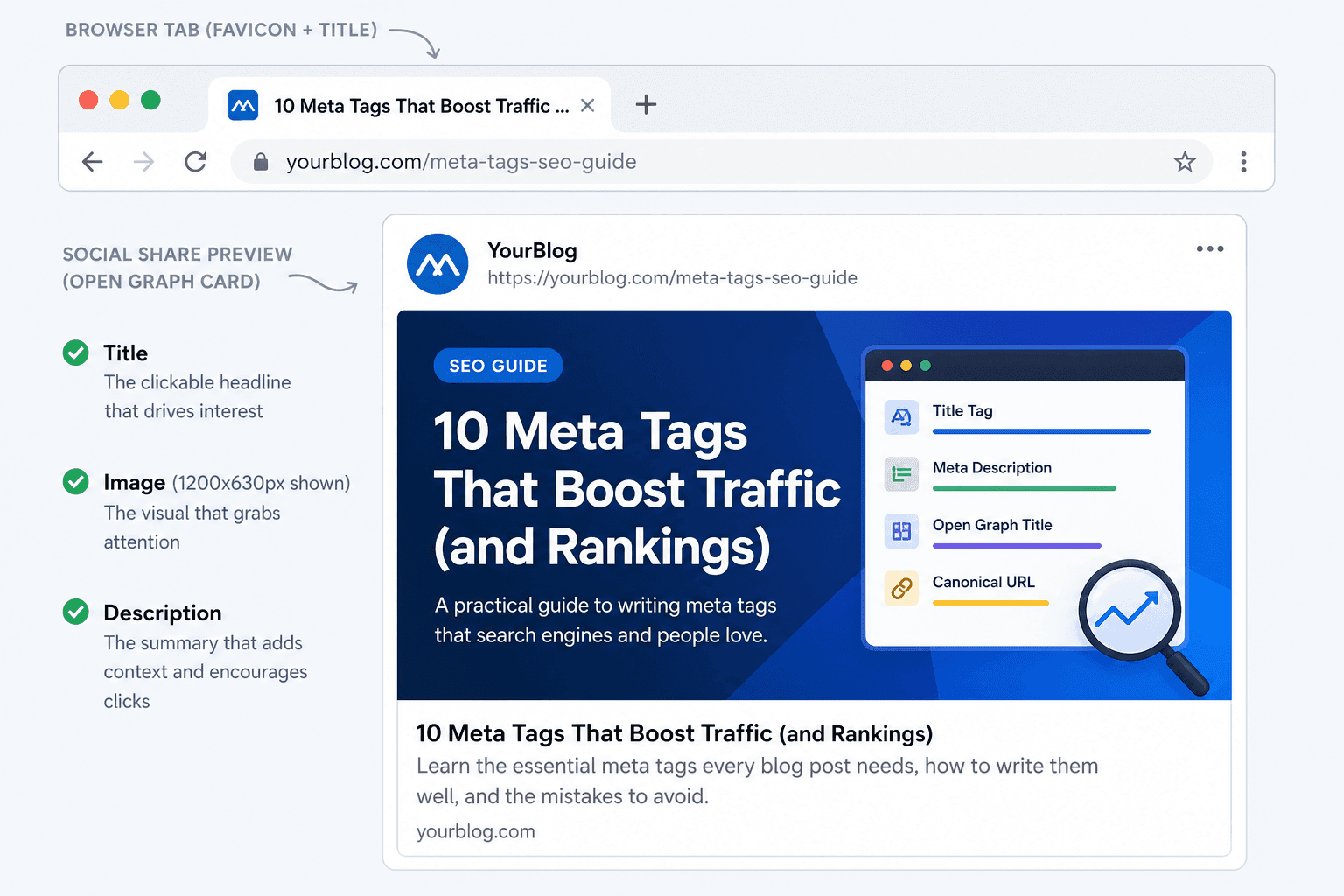
Without Open Graph and Twitter Card tags, your links share as a bare URL with no image or description. With them, every share on Facebook, LinkedIn, Slack, Discord, and X renders as a rich card — which measurably increases click-through rate from social and messaging contexts.
Open Graph (the `og:` prefix) is a protocol originally created by Facebook and now used as the de facto standard by nearly every platform that generates a link preview — LinkedIn, Slack, Discord, WhatsApp, iMessage, and most others all read Open Graph tags before falling back to anything else. If you only add one set of social tags, make it this one.
<!-- Open Graph: controls Facebook, LinkedIn, Slack, Discord previews --><meta property="og:title" content="CSS Gradient Generator — Free Online Tool"><meta property="og:description" content="Create linear, radial, and conic CSS gradients visually with live CSS output."><meta property="og:url" content="https://cssawwwards.com/tools/css-gradient-generator"><meta property="og:type" content="website"><meta property="og:image" content="https://cssawwwards.com/og/css-gradient-generator.png"><meta property="og:site_name" content="CSSAWWWARDS">Use a 1200×630px image (a 1.91:1 aspect ratio). This is the size every major platform expects, and using it avoids the awkward cropping that happens when a square or portrait image gets forced into a landscape card. Keep the file under roughly 1MB and make sure the most important content — your headline, your product, your key visual — sits in the center, since some clients crop more aggressively at the edges than others.
It's a common assumption that X/Twitter will just read your Open Graph tags if you don't specify Twitter Card tags separately. In practice this fallback is unreliable enough that you shouldn't depend on it — explicit `twitter:` tags are the only consistent way to control how your links render there.
<!-- Twitter Card: don't rely on Open Graph fallback --><meta name="twitter:card" content="summary_large_image"><meta name="twitter:site" content="@cssawwwards"><meta name="twitter:title" content="CSS Gradient Generator — Free Online Tool"><meta name="twitter:description" content="Create linear, radial, and conic CSS gradients visually."><meta name="twitter:image" content="https://cssawwwards.com/og/css-gradient-generator.png">Validate, don't assume:Social platforms cache link previews aggressively. After changing OG or Twitter tags, use a debugging tool (X's Card Validator, Facebook's Sharing Debugger, or LinkedIn's Post Inspector) to force a re-scrape — otherwise you may be looking at a stale cached preview and think your change didn't work.
A handful of Open Graph extensions are worth adding for content-heavy pages even though they're not strictly required: `og:locale` declares the page's language/region, and the `article:` namespace (`published_time`, `modified_time`, `author`) gives platforms — and increasingly, AI systems assessing how current a piece of content is — explicit, structured dates rather than forcing them to guess from visible text.
<!-- Useful but optional OG extensions --><meta property="og:locale" content="en_US"><meta property="article:published_time" content="2026-06-19T08:00:00+00:00"><meta property="article:modified_time" content="2026-06-19T08:00:00+00:00"><meta property="article:author" content="https://cssawwwards.com/publisher/adil-badshah">That last point matters more than it used to. Freshness is one of the signals both traditional search ranking and AI-generated answers weigh when a query implies the user wants current information — an explicit `article:modified_time` is a clean, unambiguous way to communicate that, rather than relying on the model or crawler to infer a publish date from a visible “last updated” string buried in the page.
You can generate a complete, correctly formatted block of title, description, canonical, Open Graph, and Twitter Card tags — with a live preview of exactly how the result looks on each platform — using the Open Graph & Meta Tag Generator. It's built specifically to catch the small mistakes (wrong card type, missing site name, mismatched title between OG and Twitter) that are easy to miss when writing these tags by hand.
Quick Answer
A favicon isn't a direct ranking factor, but Google displays it next to mobile search results, browsers show it in every open tab, and a missing or broken favicon is one of the fastest ways to make a legitimate site look unfinished or untrustworthy at a glance.
Favicons get treated as an afterthought because they're small and easy to forget — but they're also one of the few brand elements visible in literally every context: browser tabs, bookmarks, mobile search results, home screen icons, and browser history. A missing favicon (the generic globe or blank-page icon) or a pixelated, stretched one is a tiny but real signal of neglect, and neglect is exactly the kind of impression you don't want to give either users or the systems evaluating your site's overall quality and trustworthiness.
A single `favicon.ico` in the root directory used to be enough. In 2026, browsers and platforms expect a fuller set: 16×16 and 32×32 PNG favicons for browser tabs and bookmarks, a 180×180 apple-touch-icon for iOS home screens, 192×192 and 512×512 Android Chrome icons for Android home screens and PWA install prompts, and a `site.webmanifest` file that ties the Android icons together with your app's name and theme color.
<!-- Modern favicon + app icon set --><link rel="icon" type="image/png" sizes="32x32" href="/favicon-32x32.png"><link rel="icon" type="image/png" sizes="16x16" href="/favicon-16x16.png"><link rel="apple-touch-icon" sizes="180x180" href="/apple-touch-icon.png"><link rel="manifest" href="/site.webmanifest"><link rel="icon" href="/favicon.ico" sizes="any"><meta name="theme-color" content="#1d9e75">The web manifest referenced above is what makes a site eligible for “Add to Home Screen” prompts on Android and gives installed PWAs a proper name, icon, and theme color instead of falling back to a generic browser-chrome look.
{ "name": "CSSAWWWARDS", "short_name": "CSSAWWWARDS", "icons": [ { "src": "/android-chrome-192x192.png", "sizes": "192x192", "type": "image/png" }, { "src": "/android-chrome-512x512.png", "sizes": "512x512", "type": "image/png" } ], "theme_color": "#1d9e75", "background_color": "#ffffff", "display": "standalone"}A single favicon was enough back when “browsing the web” meant a desktop browser tab and nothing else. Two platform shifts changed that. First, iOS introduced the home-screen bookmark, which needed its own larger, non-transparent icon — Apple ignores your regular favicon entirely and looks specifically for `apple-touch-icon`, falling back to taking an ugly automatic screenshot of the page if it's missing. Second, Android and Chrome added installable web apps, which need their own icon sizes declared in a manifest file rather than just a `<link>` tag. Neither platform is going away, so both icon sets are now table stakes rather than nice-to-haves.
The `theme-color` meta tag is a small detail with an outsized visual impact on mobile: it tints the browser's address bar and the OS task-switcher card to match your brand, which costs one line of code and meaningfully improves how polished the site feels on a phone.
The classic `.ico` format can store multiple resolutions in one file, but modern browsers render PNG favicons more sharply at small sizes, and declaring explicit sizes via separate `<link>` tags lets the browser pick the exact resolution it needs instead of scaling a single image up or down. Most production sites in 2026 ship both: PNGs as the primary declaration for modern browsers, and a `.ico` as a fallback for older tools, RSS readers, and crawlers that still default to requesting `/favicon.ico` directly regardless of what's declared in the `<head>`.
Generating this entire set by hand — resizing a logo to six different dimensions, hand-rolling a valid `.ico` container, writing a correct web manifest — is exactly the kind of one-time, easy-to-get-wrong task worth automating. The Favicon & App Icon Generator takes a single source image and outputs every size above, a valid `favicon.ico`, the manifest, and the exact `<head>` snippet to paste in — packaged as a ready-to-drop-in zip.
Quick Answer
The most common technical SEO meta tag mistakes are duplicate titles/descriptions across pages, missing canonical tags on parameterized URLs, Open Graph images that are the wrong dimensions, and noindex tags accidentally left on production pages after staging.
Auto-generating a title from a template (“{Product Name}| Buy Online”) is fine as a starting point, but if hundreds of pages end up with near-identical titles and descriptions, you've created the exact duplicate-content ambiguity a canonical tag is supposed to prevent — except this time it's in the content search engines use to differentiate pages, not the URL.
Filter, sort, and tracking parameters (`?sort=price`, `?ref=newsletter`) are the single most common source of accidental duplicate URLs on e-commerce and content sites. If your canonical tag isn't set to point back at the clean, parameter-free URL, each variant can get crawled and indexed as if it were a distinct page.
A square logo or a tall portrait screenshot used as an `og:image` will get cropped unpredictably across platforms. Stick to the 1200×630px standard from the section above rather than reusing whatever image happens to be on the page.
This one is sneaky:staging environments commonly set `<meta name="robots" content="noindex">` to keep search engines out. If that tag is set via an environment variable that isn't correctly flipped in production — or worse, hardcoded and forgotten — an entire production site can silently sit out of the index for months. Always verify the rendered `<head>` on the live production URL, not just the staging one.
It's easy for the `<title>`, `og:title`, and `twitter:title` to drift apart over multiple edits. They don't need to be byte-for-byte identical — the OG/Twitter versions can be shorter and punchier for a social context — but they should clearly describe the same page. A mismatch reads as broken or spammy to anyone comparing the search result to the page they land on.
`og:url`, `og:image`, and `<link rel="canonical">` should always be absolute URLs (`https://example.com/page`), never relative (`/page`). Several crawlers and most social platforms simply fail to resolve a relative URL against the page's own location reliably, which means a relative canonical can silently fail to consolidate anything, and a relative `og:image` can render as a broken image in a shared link.
A classic post-migration bug:after moving from `www.example.com` to `example.com` (or http to https), canonical tags generated from an old template or cached build can keep pointing at the retired domain. Search engines will dutifully respect that canonical and consolidate signals onto a URL that no longer serves your current content — quietly suppressing the new domain's rankings for months. Always spot-check rendered canonical tags immediately after any domain or protocol change.
Quick Answer
Rather than hand-writing meta tags and resizing favicon images for every project, two free CSSAWWWARDS tools generate a complete, validated set in under two minutes each — with a live preview so you can see exactly what you're shipping before you copy the code.
The Open Graph & Meta Tag Generatortakes your title, description, canonical URL, site name, and image, and outputs a complete `<title>`, meta description, canonical link, Open Graph block, and Twitter Card block — with live mockups showing exactly how the result renders on X/Twitter, Facebook/LinkedIn, and as a Google search snippet, so you catch sizing and copy issues before you ship rather than after.
The Favicon & App Icon Generatortakes a single source image — your logo, ideally 512×512px or larger — and produces every favicon size, a real multi-resolution `.ico` file, Android Chrome and Apple touch icons, a web manifest, and the exact `<head>` snippet, all packaged as one downloadable zip ready to drop into your project's public folder.
Both run entirely in your browser — nothing is uploaded to a server, which matters if your logo or copy is still confidential pre-launch.
Generating correct tags is half the job — confirming they render correctly in production is the other half. Before calling a page done, check: the rendered `<title>` and meta description in the browser's view-source (not just your CMS field, which can differ from what actually ships), the canonical URL is absolute and points at the right domain, the Open Graph image loads and is roughly 1200×630px, and the favicon appears in the browser tab without a console 404. Google Search Console's URL Inspection tool will show you exactly what Googlebot saw on its last crawl, which is the closest thing to ground truth you'll get without waiting for a re-crawl.
Do meta tags directly improve Google rankings?
Not directly. The meta description isn't a ranking factor, but it shapes your search snippet and therefore your click-through rate — a behavioral signal that compounds over time. The title tag carries more direct relevance weight.
What is the ideal meta description length in 2026?
Roughly 120–165 characters. Google's snippet truncation point shifts slightly across devices and over time, so write a complete, compelling sentence in that range rather than engineering it to an exact character count.
Do favicons affect SEO?
Not as a direct ranking factor, but Google displays favicons next to mobile search results, and a missing one is a small but visible signal of an unmaintained site.
What size should an Open Graph image be?
1200×630px — a 1.91:1 ratio that displays cleanly across Facebook, LinkedIn, and Twitter's summary_large_image card without awkward cropping.
Do I need both Open Graph and Twitter Card tags?
Yes. X/Twitter doesn't reliably fall back to Open Graph, so explicit Twitter Card tags are the safer choice alongside your OG tags, not a redundant extra.
Is a canonical tag necessary if a page has no duplicates?
Yes — a self-referencing canonical is cheap insurance against tracking parameters or trailing-slash variants accidentally creating duplicate URLs later.
What's the difference between a .ico favicon and PNG favicons?
PNG favicons declared via explicit `<link>` tags render more sharply at small sizes in modern browsers. Most sites ship both: PNGs as the primary declaration, `.ico` as a fallback for tools that request it directly.
What's the difference between robots.txt and a noindex meta tag?
`robots.txt` controls whether a crawler can request a URL at all. A `noindex` meta tag tells a crawler that has already fetched the page not to include it in search results. For pages you want genuinely excluded, `noindex` is the correct tool — a `robots.txt`-blocked page can still occasionally surface as a bare link if other sites reference it.
