
What Are CSS Design Tokens?
Quick Answer
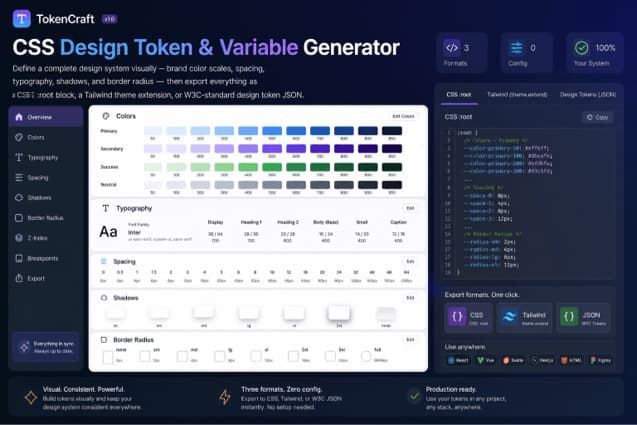
CSS design tokens are named values that represent the foundational decisions of a design system — brand colors, spacing increments, font sizes, shadows, and border radii. In CSS, tokens are implemented as custom properties (--color-primary-500, --spacing-4, --text-lg) declared on :root. A CSS design token generator automates the creation of these variables from a handful of base inputs, producing an exportable, complete token set in seconds.
The concept of design tokens was first articulated by Jina Anne and the Salesforce Lightning Design System team around 2014, and has since become the standard architecture for design systems at companies like Google, GitHub, Atlassian, Adobe, and Shopify. The core idea is simple: rather than hardcoding values like #1D9E75 or 16px throughout your CSS, you assign each value a name that describes its purpose and store it in a single, canonical location.
In CSS, that canonical location is the :root block, and the storage mechanism is custom properties. The result is a stylesheet that reads like a design specification — var(--color-accent), var(--spacing-4), var(--radius-md) — rather than a collection of magic numbers scattered across hundreds of rules.
The W3C Design Tokens Community Group has been working to standardize the token format since 2019, producing a specification for a cross-platform JSON schema that can be consumed by build tools, design applications like Figma, and mobile frameworks. The draft specification is already implemented in tools like Style Dictionary, Theo, and Figma Tokens.
Industry adoption:Tailwind CSS v4.0 uses CSS custom properties as its native token system. Material Design 3 ships its entire color system as CSS variables. GitHub’s Primer design system, Shopify’s Polaris, and Adobe Spectrum all ship tokens first and derive component styles from them. Design tokens are no longer an architectural pattern for large teams only — they are the baseline expectation for maintainable CSS.
A CSS design token generator removes the tedious part: you do not need to manually compute 10 stops of a color scale, calculate em values for a modular type scale, or hand-craft shadow definitions for each elevation level. Provide the base inputs — a brand hex, a spacing unit, a type scale ratio — and the generator produces a complete, consistent, export-ready token set.
Use the CSS Design Token & Variable Generator on CSSAWWWARDS to generate a complete token set — colors with full 50–950 scales, spacing, typography, shadows, and radii — and export it as CSS :root, a Tailwind config extension, or W3C design token JSON. No signup required.
Primitive vs Semantic Tokens
Quick Answer
Primitive tokens are raw values: --color-green-500: #1D9E75. Semantic tokens name purpose, not value: --color-accent: var(--color-green-500). Components reference semantic tokens. Dark mode and theme switching only change which primitive each semantic token points to — no component CSS needs to change.
The most important architectural decision in a token system is the two-layer model: primitives and semantics. Primitive tokens are the raw palette — every color stop, every spacing increment, every shadow definition. Semantic tokens sit above the primitives and describe how a value is used, not what it is.
/* Primitive tokens (the raw values) */:root { --color-primary-500: #1D9E75; --color-primary-600: #168a63; --color-neutral-0: #ffffff; --color-neutral-900: #111827; --color-neutral-50: #f9fafb; --color-neutral-200: #e5e7eb;} /* Semantic tokens (purpose-named, point to primitives) */:root { --color-background: var(--color-neutral-0); --color-surface: var(--color-neutral-50); --color-border: var(--color-neutral-200); --color-text: var(--color-neutral-900); --color-accent: var(--color-primary-500); --color-accent-hover: var(--color-primary-600);} /* Dark mode — only semantic tokens change */[data-theme="dark"] { --color-background: #0f0f0f; --color-surface: #1a1a1a; --color-border: #2d2d2d; --color-text: #f0f0f0; --color-accent: #34d399; --color-accent-hover: #10b981;}The payoff of this separation appears clearly in dark mode. When the data-theme="dark" attribute is applied to <html>, only the semantic token values change. Every component that uses var(--color-background), var(--color-text), and var(--color-accent) updates automatically — not because you wrote dark-mode CSS for each component, but because the semantic tokens they reference now point to different primitive values. This is the architectural advantage of two-layer tokens over flat variable systems.
For teams working across web and mobile, the primitive/semantic split also maps cleanly to the W3C design token format. Primitives become the base token file; semantic tokens become an alias layer. Both are expressible in the JSON format supported by Style Dictionary and Theo, making the same token decisions available as CSS variables, Swift constants, and Android resource XML.
Building a Color Token Scale (50–950)
Quick Answer
A 10-stop color scale (50–950) is generated from a base color by converting it to HSL and adjusting lightness across the range — from near-white at 50 to near-black at 950. The 500 stop is conventionally the base brand color. A CSS design token generator computes all stops automatically and names them --color-{brand}-50 through --color-{brand}-950.
The 50–950 naming convention was popularized by Tailwind CSS and has since become the de facto standard for color token scales across the industry. The scale follows a perceptually even lightness curve: each stop is meaningfully lighter or darker than its neighbors when viewed at design scale, and adjacent stops maintain sufficient contrast for interactive state differentiation (default / hover / active / disabled).
/* Generated by a CSS design token generator */:root { /* Primary color — full 50–950 scale */ --color-primary-50: #e6f7f2; --color-primary-100: #c0ebdf; --color-primary-200: #93ddca; --color-primary-300: #5fcfb3; --color-primary-400: #35c29e; --color-primary-500: #1D9E75; /* base brand color */ --color-primary-600: #168a63; --color-primary-700: #0e7250; --color-primary-800: #075a3d; --color-primary-900: #013d28; --color-primary-950: #002418;}The generation algorithm works in HSL space. Take the base hex value, convert to hue/saturation/lightness, then produce lighter stops by increasing lightness toward 95–98% (reducing saturation slightly to avoid washed-out pastels) and darker stops by decreasing lightness toward 8–12% (increasing saturation slightly to maintain vibrancy). The result matches the visual logic of the Tailwind color palette, which itself was designed using a similar HSL-interpolation approach.
Why 10 stops — not 5, not 20?
Ten stops (50, 100, 200, 300, 400, 500, 600, 700, 800, 900, plus the lightweight 950 for ultra-dark contexts) gives enough granularity to handle all the typical states of a UI component — background, border, text, icon, hover, active, focus ring, disabled — without creating a palette so large it becomes impossible to reason about. Most components need 4–6 stops from a given color. Ten stops means you are never reaching for a value that does not exist.
If you need a second brand color, a neutral gray, a semantic danger red, and a success green, a CSS design token generator produces all four full scales from their respective base hex values — giving you 44 color tokens (11 stops × 4 colors) from four inputs in seconds.
Spacing Design Tokens
Quick Answer
Spacing tokens map a base unit (4px or 8px) to named steps. A 4px base produces --spacing-1: 4px, --spacing-2: 8px, --spacing-4: 16px and so on, following the Tailwind spacing scale convention. Using a CSS design token generator keeps spacing consistent across the codebase — every padding, margin, and gap references the same scale.
Spacing is the most frequently referenced token category in a stylesheet. Buttons, cards, form fields, grid gaps, section paddings, list item margins — every layout decision reaches for the spacing scale. Without a token system, these values scatter across the codebase as magic numbers: padding: 12px 16px here, margin-bottom: 24px there, gap: 8px elsewhere, with no guarantee they refer to the same underlying rhythm.
/* Spacing design tokens — 4px base unit */:root { --spacing-px: 1px; --spacing-0: 0; --spacing-1: 4px; --spacing-2: 8px; --spacing-3: 12px; --spacing-4: 16px; --spacing-5: 20px; --spacing-6: 24px; --spacing-8: 32px; --spacing-10: 40px; --spacing-12: 48px; --spacing-16: 64px; --spacing-20: 80px; --spacing-24: 96px; --spacing-32: 128px;}The steps in the scale intentionally do not increment linearly. The lower steps (1–4) increment by 4px for fine-grained control of compact UI elements. The upper steps (8, 10, 12, 16, 20, 24, 32) use larger jumps appropriate for section spacing, page margins, and large-scale layout. This matches the intuition that small UI components need precise control at the 4px level, while large layout structures operate at 32px–128px increments.
Choosing 4px vs 8px as your base unit is a meaningful design decision. A 4px base (1 = 4px, 2 = 8px) gives you finer control and aligns with Google Material Design conventions. An 8px base (1 = 8px, 2 = 16px) aligns with Tailwind’s default spacing and produces a more aggressive visual rhythm. Either is defensible — the important thing is to commit to one and derive all spacing from it, rather than allowing arbitrary pixel values to accumulate.
Typography Tokens
Quick Answer
Typography tokens name font sizes, line heights, and font stacks as CSS custom properties. A type scale maps named steps — xs through 5xl — to rem values. Using rem ensures the scale respects the user’s browser font size preference. Line height and font family tokens ensure typographic consistency without hardcoding values in component CSS.
Typography tokens cover three distinct concerns: font size (the scale), line height (the leading), and font family (the stack). Each is better expressed as a named token than as a raw value in component rules, because the same font size or line height tends to appear across many components — and changing the type scale should be a single-file modification, not a grep-and-replace across the codebase.
/* Typography design tokens */:root { --text-xs: 0.75rem; /* 12px */ --text-sm: 0.875rem; /* 14px */ --text-base: 1rem; /* 16px */ --text-lg: 1.125rem; /* 18px */ --text-xl: 1.25rem; /* 20px */ --text-2xl: 1.5rem; /* 24px */ --text-3xl: 1.875rem; /* 30px */ --text-4xl: 2.25rem; /* 36px */ --text-5xl: 3rem; /* 48px */ --font-sans: ui-sans-serif, system-ui, -apple-system, sans-serif; --font-mono: "DM Mono", ui-monospace, monospace; --leading-tight: 1.25; --leading-normal: 1.5; --leading-relaxed: 1.625;}Using rem for font size tokens is essential for accessibility. The MDN specification for font-sizenotes that rem values are relative to the root element’s computed font size — which browsers default to 16px but users can change in their preferences. A user who has set their browser default to 20px will receive proportionally larger type across the entire type scale automatically, without any extra work on your part. This is why pixel-based type scale tokens are an accessibility risk: they override the user’s stated preference.
The line height tokens (--leading-tight, --leading-normal, --leading-relaxed) are unitless values, following the recommendation from the WCAG 2.1 Success Criterion 1.4.12 for text spacing. Unitless line heights scale proportionally with font size — a critical behavior for accessible typography that pixel or em line heights can break.
Shadow and Border Radius Tokens
Quick Answer
Shadow tokens define elevation levels as named CSS custom properties — --shadow-sm through --shadow-xl — each containing a complete box-shadow value. Border radius tokens map names (--radius-sm through --radius-full) to pixel values. Both remove magic numbers from component CSS and allow the entire elevation and shape system to change from one location.
Shadow values are among the most verbose in CSS — a single box-shadow declaration can span 6 values plus a color. Writing the same shadow declaration in every card, modal, and dropdown component leads to inconsistency the moment one definition needs updating. Shadow tokens solve this by giving each elevation level a name and storing the full value as a token.
/* Shadow design tokens */:root { --shadow-sm: 0 1px 2px 0 rgba(0,0,0,0.08); --shadow-md: 0 4px 8px 0 rgba(0,0,0,0.10); --shadow-lg: 0 10px 24px 0 rgba(0,0,0,0.12); --shadow-xl: 0 20px 48px 0 rgba(0,0,0,0.14); /* Border radius tokens */ --radius-sm: 4px; --radius-md: 8px; --radius-lg: 12px; --radius-xl: 16px; --radius-2xl: 24px; --radius-full: 9999px;}The conventional elevation scale uses four levels — sm (subtle, for interactive controls), md (moderate, for cards and panels), lg (prominent, for modals and popovers), xl (maximum, for drawers and overlays). Each level increases blur radius and shadow opacity to produce a progressively stronger illusion of height. The CSS design token generator uses rgba(0,0,0,{opacity}) for shadow color, which integrates cleanly with both light and dark backgrounds — though some design systems prefer hsl shadow colors tuned to the brand.
Border radius tokens serve a similar purpose for shape. A design system commits to a shape vocabulary — rounded corners of specific radii for buttons, cards, inputs, badges, and avatars — and expresses those as named tokens. --radius-full: 9999px is the idiomatic token for pill-shaped elements (it works regardless of element height). Centralizing radius values means changing from a sharp-cornered to a rounded design language is a token-level change, not a component-by-component search.
Dark Mode with Design Tokens
Quick Answer
Dark mode with design tokens requires only two steps: define semantic tokens on :root pointing to light-mode primitives, then add a [data-theme="dark"] block redefining those semantic tokens to dark-mode values. Toggle the attribute with JavaScript. Every component using semantic tokens updates automatically — no component-level dark mode CSS needed.
The semantic token layer described in section 2 is what makes dark mode genuinely scalable. Without it, you need to write dark-mode overrides for every component selector — a maintenance burden that grows linearly with the size of the design system. With semantic tokens, dark mode is a two-block CSS change regardless of how many components exist in the system.
The pattern used in the CSS Design Token Generator generates both the primitive token block and the semantic token block with dark mode values, producing a [data-theme="dark"] override with inverted color stops automatically. The 50-stop color (near-white) becomes the dark mode text color; the 900-stop (near-black) becomes the dark mode background. Accent colors shift to lighter stops (300–400 range) to maintain contrast against dark backgrounds.
For OS-level dark mode detection without JavaScript, combine the data-theme attribute approach with a prefers-color-scheme media query fallback:
/* Auto dark mode based on OS preference */@media (prefers-color-scheme: dark) { :root:not([data-theme="light"]) { --color-background: #0f0f0f; --color-surface: #1a1a1a; --color-text: #f0f0f0; --color-accent: #34d399; }} /* Manual override takes precedence */[data-theme="dark"] { --color-background: #0f0f0f; --color-surface: #1a1a1a; --color-text: #f0f0f0; --color-accent: #34d399;}The :not([data-theme="light"])selector on the media query ensures the manual “force light” override takes precedence over the OS preference — a critical detail for user preference controls.
Export Formats: CSS, Tailwind, and W3C JSON
Quick Answer
A CSS design token generator exports tokens in three formats: a CSS :root block (paste directly into any stylesheet), a tailwind.config.js theme extension (use with Tailwind v3/v4), and W3C design token JSON (use with Style Dictionary, Theo, or Figma Tokens). Choose the format that matches your toolchain.
CSS :root export
The CSS export is a complete :root block containing every token as a custom property. It is framework-agnostic and works in any CSS file — paste it into a globals.css, a tokens.css imported at the root of your app, or a <style> block in your HTML. No build tool required.
Tailwind config export
The Tailwind export produces a theme.extend block you can paste directly into tailwind.config.js. This wires Tailwind’s utility classes to your design tokens — bg-primary-500, p-4, text-lg, rounded-md — making the utility classes consistent with your token definitions.
// tailwind.config.js — generated by CSS design token generator
module.exports = {
  theme: {
    extend: {
      colors: {
        primary: {
          50:  "#e6f7f2",
          100: "#c0ebdf",
          200: "#93ddca",
          300: "#5fcfb3",
          400: "#35c29e",
          500: "#1D9E75",
          600: "#168a63",
          700: "#0e7250",
          800: "#075a3d",
          900: "#013d28",
          950: "#002418",
        },
      },
      spacing: {
        1: "4px",
        2: "8px",
        3: "12px",
        4: "16px",
        6: "24px",
        8: "32px",
        12: "48px",
        16: "64px",
      },
      borderRadius: {
        sm: "4px",
        md: "8px",
        lg: "12px",
        xl: "16px",
        "2xl": "24px",
      },
    },
  },
};
W3C design token JSON export
The W3C JSON export follows the Design Tokens Community Group specification draft. This format is consumed by Style Dictionary (Amazon), Theo (Salesforce), and Figma Tokens — tools that transform a single token source into platform-specific outputs (CSS, Swift, Kotlin, XML).
// W3C Design Token Community Group format (DTCG)
{
  "color": {
    "primary": {
      "500": { "$value": "#1D9E75", "$type": "color" },
      "600": { "$value": "#168a63", "$type": "color" },
      "50":  { "$value": "#e6f7f2", "$type": "color" }
    }
  },
  "spacing": {
    "4": { "$value": "16px", "$type": "dimension" },
    "8": { "$value": "32px", "$type": "dimension" }
  },
  "shadow": {
    "md": {
      "$value": "0 4px 8px 0 rgba(0,0,0,0.10)",
      "$type": "shadow"
    }
  }
}
Each token entry has a $value (the raw value) and a $type (the token type: color, dimension, shadow, fontFamily, etc.). The type tells transformation tools how to handle the value — a color token in CSS becomes a hex string, in Swift a UIColor, in Android a @color resource.
Using CSS Design Tokens in Real Components
Quick Answer
Components reference semantic tokens, not primitive values. A button uses var(--color-accent), not var(--color-primary-500) directly. This keeps components theme-agnostic — they adapt to any theme that redefines the semantic tokens without a single line of component CSS changing.
Once the token system is in place, writing component CSS becomes noticeably cleaner. Instead of hardcoded values scattered across component files, every value references a named token. The component CSS reads as a specification of purpose rather than a list of pixel values:
/* A button component consuming design tokens */.btn-primary { background-color: var(--color-accent); color: #ffffff; padding: var(--spacing-2) var(--spacing-4); border-radius: var(--radius-md); font-size: var(--text-sm); line-height: var(--leading-normal); box-shadow: var(--shadow-sm); transition: background-color 0.15s ease;} .btn-primary:hover { background-color: var(--color-accent-hover); box-shadow: var(--shadow-md);} /* The dark mode is automatic — no extra CSS needed *//* [data-theme="dark"] already redefines --color-accent */This component requires zero additional dark mode CSS. The [data-theme="dark"] block defined at the token level handles it entirely. If the brand color changes next quarter, a single token update — --color-primary-500 in the primitive layer, --color-accent in the semantic layer — propagates to every component simultaneously. This is the core promise of a token-based design system.
The practical workflow is: define the token system once using the CSS design token generator, import the generated CSS at the root of your app, then write all component CSS against the semantic token names. Any component written against tokens is automatically theme-compatible and update-safe.
Related tool: Once your color tokens are defined, use the Color Contrast Checker to verify that your semantic color pairings (text on background, text on surface, accent on background) meet WCAG AA (4.5:1 ratio) and AAA (7:1 ratio) standards. Design tokens that fail contrast requirements create an accessibility debt that compounds across every component that uses them.
Token Tooling: Style Dictionary, Theo, and Figma Tokens
Quick Answer
Style Dictionary (Amazon) and Theo (Salesforce) transform W3C-format token JSON into platform outputs — CSS custom properties, Swift, Kotlin, XML. Figma Tokens (now Variables) syncs tokens between Figma and code. Using these tools with the W3C JSON export from a CSS design token generator makes the same token set available on web, iOS, Android, and in Figma designs simultaneously.
For teams that need tokens on multiple platforms — a React web app, a React Native mobile app, and Figma — the W3C JSON export from a CSS design token generator is the entry point into a multi-platform token pipeline. The standard tool for this pipeline is Style Dictionary (open source, maintained by Amazon). Style Dictionary takes a token JSON file (or directory of files) and transforms it into outputs for every configured platform:
// Style Dictionary config — transforms W3C JSON to CSS + iOS + Android
module.exports = {
  source: ["tokens/**/*.json"],
  platforms: {
    css: {
      transformGroup: "css",
      buildPath: "build/css/",
      files: [{ destination: "tokens.css", format: "css/variables" }],
    },
    ios: {
      transformGroup: "ios-swift",
      buildPath: "build/ios/",
      files: [{ destination: "StyleDictionary.swift", format: "ios-swift/class.swift" }],
    },
    android: {
      transformGroup: "android",
      buildPath: "build/android/",
      files: [{ destination: "tokens.xml", format: "android/resources" }],
    },
  },
};
The same token source that produces your CSS :root block automatically produces StyleDictionary.swift for iOS and tokens.xml for Android. Token changes propagate to all platforms simultaneously on the next build. This eliminates the common failure mode where the web team updates a color but the iOS team is still using the old hex value.
Figma Tokens (the plugin, now largely superseded by Figma’s native Variables feature) and Theo(Salesforce’s transform tool) serve similar roles in different toolchain contexts. Figma Variables, introduced in 2023, allows design tokens to be defined directly in Figma and synced to code repositories via REST API — closing the design-to-code loop from the design side. Teams can generate primitive and semantic token sets in Figma and push them to the codebase without manually exporting JSON.
For most projects that do not need native mobile output, the CSS export from a design token generator is sufficient. The W3C JSON format is the migration path if cross-platform requirements emerge later — well-structured CSS tokens can be reverse-engineered into W3C JSON without significant effort.
Frequently Asked Questions
- What are CSS design tokens?
- CSS design tokens are named values — colors, spacing, font sizes, shadows, border radii — that represent the foundational decisions of a design system. In CSS, they are implemented as custom properties (
--color-primary-500,--spacing-4,--text-lg) declared on:root. A CSS design token generator automates the creation of these properties from base inputs like a brand hex color and a spacing unit. - What is the difference between design tokens and CSS variables?
- CSS variables (custom properties) are the browser implementation. Design tokens are the concept — named, platform-independent values that represent design decisions. When you implement design tokens in CSS, you use custom properties as the delivery mechanism. The same token can also be exported as Swift constants, Android XML resources, or Figma Variables using tools like Style Dictionary.
- How do you create a color scale for design tokens?
- Start with a mid-range base color (the 500 stop). Convert it to HSL and generate lighter stops (50–400) by increasing lightness toward 95–98% and darker stops (600–950) by decreasing lightness toward 10–15%. A CSS design token generator does this automatically, producing 10 named stops —
--color-primary-50through--color-primary-950— from a single hex input. - What is the W3C design token format?
- The W3C Design Tokens Community Group format defines a JSON structure for cross-platform token sharing. Each token has a
$valueand$typefield. The format is supported by Style Dictionary, Theo, and Figma Tokens — tools that transform tokens into platform-specific code for web, iOS, and Android from a single source of truth. - Can CSS design tokens be used with Tailwind CSS?
- Yes. CSS design token generators export a
tailwind.config.jstheme.extendblock that maps your token values to Tailwind utility classes. In Tailwind v4, CSS custom properties are the native token system — tokens defined as CSS variables on:rootcan be referenced directly in Tailwind config, eliminating the need for a separate export step. - How do design tokens support dark mode?
- Design tokens support dark mode through the semantic token layer. Define semantic tokens (
--color-background,--color-text,--color-accent) on:rootpointing to light-mode primitive values. Add a[data-theme="dark"]block redefining those same semantic tokens to dark-mode values. Every component using semantic tokens updates automatically when the attribute changes — no component-level dark mode CSS required.
Conclusion
CSS design tokens are the difference between a stylesheet and a design system. Without them, design decisions are embedded in component CSS as magic numbers — making every color change, spacing adjustment, or typography update a multi-file search-and-replace. With a token system in place, those decisions live in one place, carry meaningful names, and propagate to every component that references them.
The practical barrier to adopting tokens has always been the setup cost: computing a 10-stop color scale by hand, deriving a consistent spacing scale, writing shadow definitions for each elevation level. A CSS design token generator removes that barrier entirely. Provide a brand color and a spacing unit; receive a complete, production-ready token set — exported in the format your toolchain expects.
The two-layer architecture — primitive tokens for raw values, semantic tokens for purpose — is worth implementing from the start, even on small projects. Dark mode, white-labeling, component theming, and cross-platform token sharing all become straightforward once the semantic layer exists. Retrofitting it onto a mature codebase is significantly more work than building it in at the beginning.
To generate a complete CSS design token set for your next project — colors with full 50–950 tint scales, spacing, typography, shadows, and border radius — use the free CSS Design Token & Variable Generator on CSSAWWWARDS. Export as CSS :root, Tailwind config, or W3C JSON in one click. Browse the full Frontend Toolkit for more free CSS tools that accelerate production-quality CSS.
Share this article